Workforce optimization
Apply Workforce Optimization to use realtime and historical data for:
- Improving performance and utilization of agents and contact centers
- Pinpointing areas of excellence and improvement
Note: The current day for all reports is determined by the selected time zone displayed in the top right corner of the report dashboard. For example, if you select America - Los Angeles from the Time Zone drop-down menu, the current day will run from midnight (12:00 a.m. PST) up to the current time in the selected time zone.
Agent reports
Contact Centers/Partner Ops can use these reports to monitor high-level metrics around queue health, agent performance, productivity, and activity details over a given time period.
Wallboard
The Wallboard realtime report provides a view into some key metrics on Queues and Agent Presence. It is meant to be ever present on a monitor for supervisors and could be the starting point for any investigations.
This report can be filtered by Business Location, Queue Group, or Queue Name. Either Business Location name or Queue Group name filters can drive the Agent Presence metrics. Queue Group and Queue Name can be used to drive the Queue-related metrics on the dashboard. This report is set to auto-refresh every minute.
Supervisors and Partner Ops can use this report to answer questions such as:
- How many agents are currently logged in?
- How many unavailable and available agents are there?
- How many conversations are in queue currently?
- How many conversations were handled today?
- How many conversations were abandoned today?
- What is the longest wait time across all queues?

This report uses the Queue - Realtime and Agent Details - Realtime Explores to surface information such as:
- Logged In Agents - Total number of agents logged into the system at the moment
- Available Agents - Total number of agents available to take conversations
- Talking Agents - Total number of agents busy on a conversation
- Unavailable Agents - Total number of agents currently logged on but are not available to take any conversations
- Conversations In Queue - Total number of conversations currently in queue to be answered
- Conversations Handled - Total number of conversations handled for the day
- Conversations Abandoned - Total number of conversations abandoned from the queue today
- Conversations Today - Total number of conversations offered on the queue today
- Longest Wait Time - Longest time that a conversation has been in the queue currently.
-
Current Wait Time - Total wait time in answering a conversation from the queue based on today's queue/agent's performance. Depending on the value, this tile is highlighted using the following colors:
- RED - more than 300 seconds
- ORANGE - between 180 and 300 seconds
- YELLOW - between 60 and 180 seconds
- GREEN - less than 60 seconds
For more information on fields used in this report, see Core Conversation Metrics for detailed explanation and Queue and Agent for field definitions.
Agent activity
The Agent Activity report provides historical information on the agent’s activities for the past 6 months.
Supervisors and Partner Ops can use this report to monitor and review agent’s detailed activities and answer questions such as:
- What did the agent do over a given time period?
- How much time did an agent spend in each state over a given time period?
- What conversation IDs did an agent handle over a given time period and the queue from which they came from?
- When was the agent invited and joined the conversation?
- What was the Ring Time, Talk Time, Hold Time and Wrap-up Time spent at each time period?
- If there was a transfer, what was the type (Warm or Cold) and the reason?
- Did the agent accept or reject a specific call or did it time out while ringing (Ring Outcome)?
- How long did it take for the agent to accept the call from the time it rang?


For more information on fields used in this report, see Core Conversation Metrics for detailed explanation and Agent Dictionary for field definitions.
Agent realtime
The Agent Realtime report provides a view into the Agent's presence at the moment. This report can be filtered on a specific Business Location, Queue Group or a Supervisor. From the Agent Logon Name, users can drill into the Agent Activity view to see the detailed activity for that Agent. This report is set to auto-refresh every minute.
Supervisors and Partner Ops can use this report to answer questions such as:
- What agent presence states are my agents in currently?
- What conversations are currently assigned to my agents?
- How many conversations are currently assigned to a given agent?
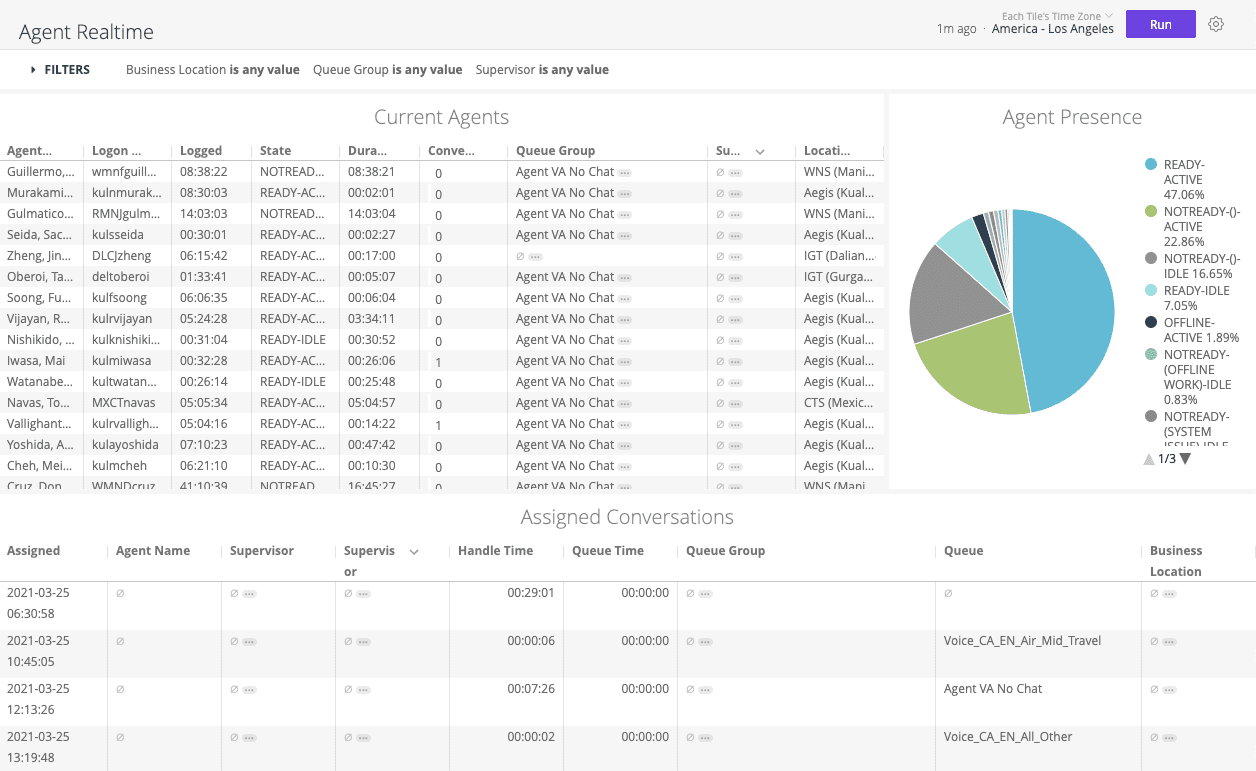
This report uses the Agent Current - Realtime and Agent Details - Realtime Explores to surface information such as:
- Bird's-eye view of Agent Presence segmented by agent states. (Agent Presence tile)
- Agent Logon Name, Agent full name, Logged in duration, Current state with reason code, Duration in the current state, Supervisor logon name, Active number of conversations, Queue Group and Business Location. (Current Agents tile)
- Agent full name, Supervisor full name, Supervisor logon name, Conversation assigned time, Conversation handle time, queue time on the conversation, Queue Group Name, queue name, and business location name. (Assigned Conversations tile). This tile also gives Supervisor's to barge into an ongoing conversation and also evaluate a conversation.
For more information on fields used in this report, see Core Conversation Metrics for detailed explanation and Agent Dictionary for field definitions.
Agent details
The Agent Details report provides detailed information on productive hours, agent state, agents, and their conversations. You can filter the results by Business Location, Queue Group, and Agent Username.
Supervisors and Partner Ops can use this report to answer questions such as:
- Which conversation types did an agent handle today?
- Which conversations did an agent handle today?
- How productive was an agent today?

This report uses the Agent Details - Realtime Explore to surface information such as conversation handle time, agent productivity, and agent identity.
For more information on fields used in this report, see Core Conversation Metrics for detailed explanation and Agent Dictionary for field definitions.
Agent detail productive hours
The Agent Detail Productive Hours report provides agent-level metrics which can be used to drill down into specific data points shown on the Workforce Management Report. Up to 4 months of this data can be explored monthly, daily, or by interval. The underlying data for the report refreshes every 30 minutes. This report can be filtered by Interval Grain, Date, Queue Group, Forecast Group, Business Location, Supervisor, and Agent.
Supervisors, Partner Ops, and EG Finance can use this report to answer questions such as:
- How productive was an agent today per interval?
- How many hours did an agent spend on inbound/outbound calls today per interval?
- How many calls per productive hour did an agent handle each day?

This report uses the Forecast - Agent Detail Explore to surface information such as:
- Agent - Agent logon username
- Interval - Interval month/date/time depending on the filter and grain at which the report is looked at
- Forecast group - Forecast group the agent is assigned to
- Productive Hours (Sum) - Total productive hours for that agent in the selected interval
- Productive Inbound Hour (Sum) - Total time accumulated on Inbound conversations
- Productive Outbound Hour (Sum) - Total time accumulated on Outbound conversations
- Productive Idle Hour (Sum) - Total time accumulated while waiting in Ready state for a conversation to start
- Productive Long Duration Action Hour (Sum) - Total time accumulated on conversations running longer than 2 hours
- Productive Long Duration Idle Hour (Sum) - Total time accumulated being available for a conversation for longer than 30 minutes
- Productive Non-Overstated Productive Hour (Sum) - Total productive time minus the time accumulated on conversations lasting more than 2 hours
- Handle Time (Avg) - Average handle time during a given interval; this metric only applies to month- and date-level filtering
- Handle Count (Sum) - Total Handle count during the given interval
- Calls per Productive Hour (Avg) - Average calls handled per productive hour for the given interval; this metric only applies to month- and date-level filtering
- Calls per Non-Overstated Productive Hour (Avg) - Average calls handled per productive hour minus long-running hours; this metric only applies to month- and date-level filtering
For more information on fields used in this report, see Core Conversation Metrics for detailed explanation and Forecast Dictionary for field definitions.
Agent login/logout
The Agent Login/Logout provides a log of the agent’s login/logout activities which the Supervisors can use for monitoring and answer questions such as:
- What is the latest login date and time of an agent?
- What is the latest logout date and time of an agent?


For more information on fields used in this report, see Core Conversation Metrics for detailed explanation and Agent Dictionary for field definitions.
Agent staffed time
The Agent Staffed Time report provides historical information on the agent’s staffed time a breakdown of all time spent by an agent in each of the unavailable states in each interval.
Supervisors can use this report to answer questions such as:
- How much time is an agent spending on an unavailable state (lunch, coaching, restroom, training, etc), taking away time from him to be available to service conversations?
- What unavailable state is the agent spending the most time on?


For more information on fields used in this report, see Core Conversation Metrics for detailed explanation and Agent Dictionary for field definitions.
Agent queue group summary
The Agent Queue Group Summary report provides a view of the productivity of agents belonging to a specific queue group, at different interval grains such as Daily, Weekly, Monthly.
Supervisors can use this report to monitor their agents’ productivity and answer questions such as:
- How many conversations were handled by agents and the average/total Handle Time?
- How much time was spent by agents to wrap-up conversations?
- What is the total staff time for each agent, and out of which how much time was the agent unavailable compared to available time?


For more information on fields used in this report, see Core Conversation Metrics for detailed explanation and Agent Dictionary for field definitions.
Agent level metrics
The Agent Level Metrics report provides a view of the volume of calls handled by an agent from a specific queue by 30-min intervals, along with other conversation metrics for consults, outbounds and transfers.
Supervisors can use this report to monitor the agents’ performance and answer questions such as:
- How many conversations were handled by specific agents and the time spent handling each conversation?
- How many calls were put on-hold by specific agents and the duration for the hold?
- How many outbound calls were made by specific agents and time spent on these calls?
- What is the volume of transfers and consults made by specific agents?


For more information on fields used in this report, see Core Conversation Metrics for detailed explanation and Agent Dictionary for field definitions.
Call level metrics
The Call Level Metrics report provides information on the call level metrics for a specific queue by 30-min intervals.
Supervisors and Ops Managers can use this report to monitor important call metrics for each queue and answer questions such as:
- What is the Average Speed of Answer (ASA) for a specific queue?
- What is the maximum delay (longest wait time) for a specific queue?
- What is the average time spent in handling and wrapping-up calls for a specific queue?
- What is the volume of abandoned calls for a specific queue?
- What is the percentage of calls answered and the volume of calls that went on ring but not answered by agents?


For more information on fields used in this report, see Core Conversation Metrics for detailed explanation and Agent Dictionary for field definitions.
Transfer details
The Transfer Details Report provides insights to Supervisors and Partner Ops into the transfer activities happening in the contact centers.
A Transfer happens when a Human Agent transfers a conversation to another entity who will continue servicing the customer, and then leaves the conversation. This entity can be:
- Another Human Agent internally (within CCaaS-Platform) i.e. different agent skill is required
- Another Human Agent externally (outside of the CCaaS-Platform)
- A Supplier i.e. for refunds, etc.
The report aims to answer questions such as:
- What is the Transfer volume over a given Period of Time?
-
What is the Transfer Connection Rate?
- This is defined as the rate of successful transfers (transfer recipient was able to join the conversation) out of the total transfers made.
- Calculated as: # of Successful Transfers/ Transfer Count
-
What is the Mode and Type of Transfer?
- Transfer Mode: The mode in which a conversation is transferred by a Human Agent to another participant of the conversation. This can either be 'On-Platform' wherein conversations are transferred within the platform, typically queue-to-queue or 'Off-Platform' wherein conversations are transferred outside of the platform to an external entity like a Supplier or other Agents in an external platform.
- Transfer Type: The type of transfer for this conversation i.e. Warm or Cold Transfer. In A Warm Transfer, a Human Agent transfers the conversation to another agent with a proper hand-off to provide context before leaving the conversation. In a Cold Transfer, a Human Agent transfers the conversation to another agent without waiting for the latter t
- What are the origin and destination queue, number and agent for the transfer?

For more information on fields used in this report, see Core Conversation Metrics for detailed explanation and Agent Dictionary for field definitions.
Supervisor activity report
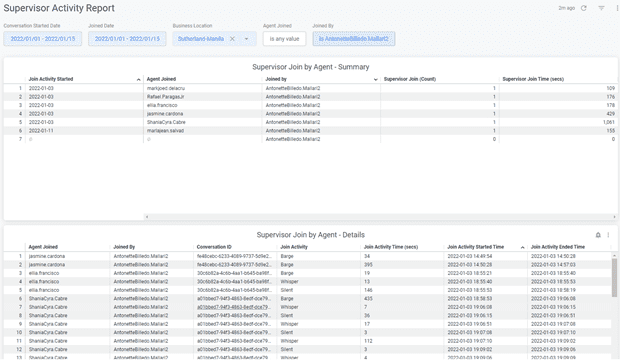
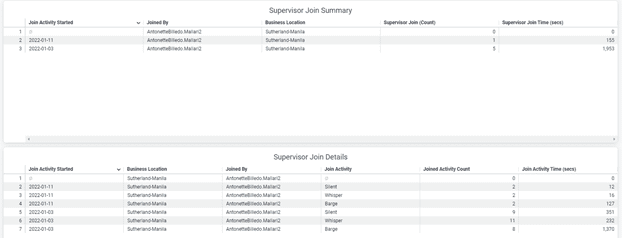
The Supervisor Activity report provides information on Supervisor Join activities such as Monitor, Whisper, Barge. When Supervisors are monitoring, they are listening on a call on stealth mode without the agent or the customer knowing. In Whisper mode, the Supervisor can coach the agent without the customer knowing. While barging will allow the Supervisor to join a conversation or take over the call. Supervisors and Ops Managers can use this report to monitor Supervisors’ coaching activities to gain insights on areas for improvement on agents’ efficiency and effectiveness, and answer questions such as:
- How frequent and how much time are supervisors spending on coaching activities or in each type of join activity?
- How frequent and how much time is spent on coaching specific agents?
- How frequent and how much time is spent by a supervisor in each type of join activity for a specific agent?
Outbound conversation report
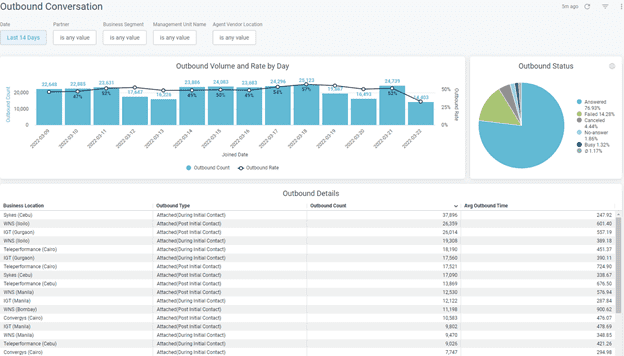
The Outbound Conversation Historical report provides information on the Outbound call activities by agents, sales, and support teams using our platform. An Outbound Conversation - Realtime also provides similar information for the day in 30-min intervals. Supervisors and Ops Managers can use this report to monitor outbound activities and answer questions such as:
- What is the volume of outbound calls for the day and the rate of outbound calls in relation to all the calls made?
• Outbound Rate = Outbound Calls (Sum) / Handled Calls (Sum) - Of the outbound calls made, what percentage was answered, failed, not answered, canceled, busy?
- What is the average outbound time spent for different outbound types in each business location?
- What is the total number of outbound calls by type for each business locations?
Recordings and transcripts
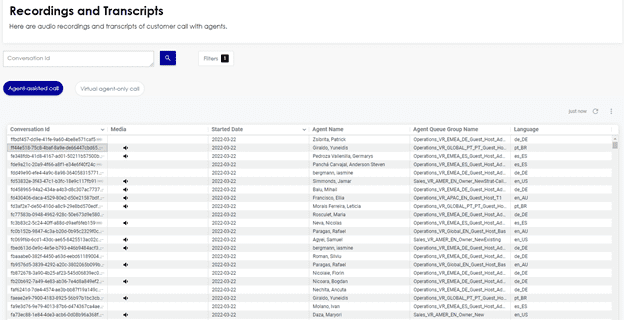
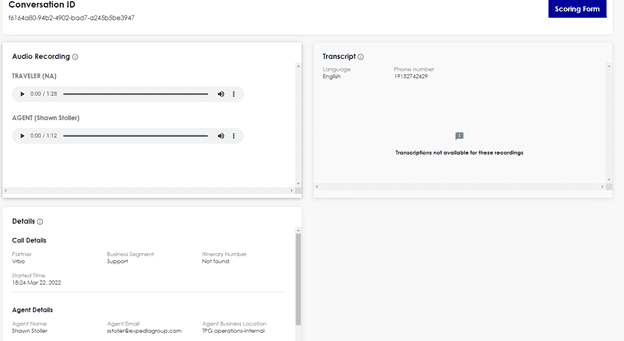
Recording and Transcripts is the new dashboard that sunsets the Voice Recordings Search dashboard and adds voice conversation transcriptions to the Playback utility on Analytics Console. Recording/Transcription capability can be leveraged by our Brands/Partners and takes up step further in Commercial Readiness. Transcription data is critically useful to build intelligent system for real-time agent recommendation to assist traveler better. This report is used by Supervisors and Quality Managers to : • Listen to Voice call recordings with multiple filters supported at conversation and participant level • Monitor Agent Performance for Workforce Optimization by listening to call recordings along with transcriptions in one view • Enable scoring and providing feedback based on the recordings and transcriptions
For definition of fields used, see Conversations Data Dictionary
Email details
The Email Details report provides information on Email performance by date, queue, and contact center vendor. It provides a summary of core metrics like Offered and Handled volumes, volume by status (e.g., claimed, spam, no response required), Average Time in Queue, and Average Handle Time (AHT) of email conversations. It also provides details of the volume and percentage (rate) of queued email conversations, and the agent’s performance in handling email conversations. Ops Managers and Supervisors can use this report to monitor operational performance for conversations in the Email channel and answer questions such as:
- How many conversations were offered and handled in the email channel?
- What is the avg time an email conversation sits in the queue and what is the average handle time (AHT)?
- What percentage of queued email conversations fall within SLAs of being handled after 24/48/72 hours?
- What is the email volume by queue, by agent and by vendor location?
- How many email conversations handled per day per hour?


For more information on metrics used in this report, see Core Conversation Metrics. For definition of fields used, see Conversations Data Dictionary.
Service request details
The Service Request Details report provides information on currently queued SR volumes and performance in handling SRs which can be used to improve operational efficiency. This report can be used by contact center vendor sites to view the current SR counts, and queue time percentages. It can be used to view daily information on case treated and how many agents allocated in each queue, case volumes per half hour and by language. Ops Managers and Supervisors can use this report to manage SR performance and answer questions such as:
- What is the busiest time of the day when SRs are being offered?
- What is the volume and percentage (rate) of SRs based on queue time of <24hrs, 24-48hrs, 48-72hrs, >72hrs, etc?
- How many SRs have been assigned in the last 30 minutes, average queue time and average handle time?
- What is the volume of conversations claimed by agent and by contact center location?

For more information on metrics used in this report, see Core Conversation Metrics. For definition of fields used, see Conversations Data Dictionary.
Service request callbacks
The Service Request Callbacks report provides information on Contact Center Vendor (CCV) sites’ SR Callback performance. The report looks at callback activities where SRs have been raised so that agents can follow up with the customer to resolve an issue. Ops Managers and CCV managers can use this report to monitor Service Request Callback activities and statuses, and answer questions such as:
- What is the current volume of SRs in the Callback queue and Supervisor queue group?
- What is the state of the SR Callback i.e., open/closed, with details of SR conversation IDs, queue, partner name and who created the SR?
- What is the volume and percentage/rate of SR Callbacks based on queue time of <24hrs, 24-48hrs, 48-72hrs, >72hrs etc?
- Which center has the highest SR Callback handle counts and average handling time?


For more information on metrics used in this report, see Core Conversation Metrics. For definition of fields used, see Conversations Data Dictionary.
Customer follow ups (Voice & Chat)
The Customer Follow Ups (Voice & Chat) report provides information on customer follow up volume and rates for Voice (platform and legacy) and Chat conversations, broken down by channel mixes and original intents. These follow ups (formerly known as CCR in legacy) are identified by the same booking, customer id, or ANI from a previous conversation, and is an indication of how well our agents are handling customer issues. Customer FollowUp Rate has correlations with Net Promoter Score (NPS) and Repeat Contact Likelihood (RCL) - metrics which can result in high/low NPS and identify in advance the areas with high possibility of having agent-assisted follow up, enabling cost savings through proactive policy implementation.
Ops Managers and Supervisors can use this report to monitor agent performance and answer questions such as:
- What is the Customer FollowUp Rate and which vendor (i.e., which agent) is contributing to this volume?
- What is the Customer Follow Up rates in specific time intervals: 15mins, 24hrs and 72hrs?
- What are the intents for these follow ups i.e., why are customers following up?


For definition of fields used, see Conversations Data Dictionary.
 For more information on metrics used in this report, see Core Conversation Metrics.
For definition of fields used, see Conversations Data Dictionary.
For more information on metrics used in this report, see Core Conversation Metrics.
For definition of fields used, see Conversations Data Dictionary.
Agent disconnect
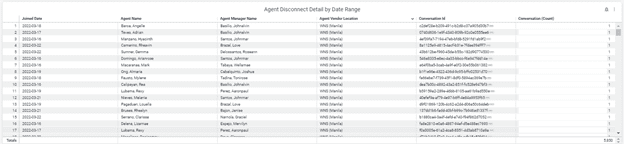
The Agent Disconnect dashboard provides information on the conversation disconnect rates and source of disconnects (e.g. human agent, virtual agent, system) and the trend over time. This presents opportunities on system performance or agent coaching. Managers and Supervisors can use this report to monitor the call disconnect rate and answer questions such as:
- What is the System vs Agent Disconnect rate per day/week on week/by language?
- Which agent and/or contact center vendor has the highest disconnect rate and their average handle time (AHT)?
- Which agent and/or contact center vendor has consistently high latency i.e., time it takes for the message from sender to the receiver then back to the sender? Higher latency can result in perceptible delays in audio, which may warrant Ops Managers/Supervisors to reach out to IT for resolutions


For more information on metrics used in this report, see Core Conversation Metrics. For definition of fields used, see Conversations Data Dictionary.
Queue and queue group reports
Contact Centers/Partner Ops can use these reports to monitor the health of their queues and track the performance of specified queue groups in the current interval. Armed with this information they can make decisions concerning queue staffing and conversation routing.
Queue group realtime
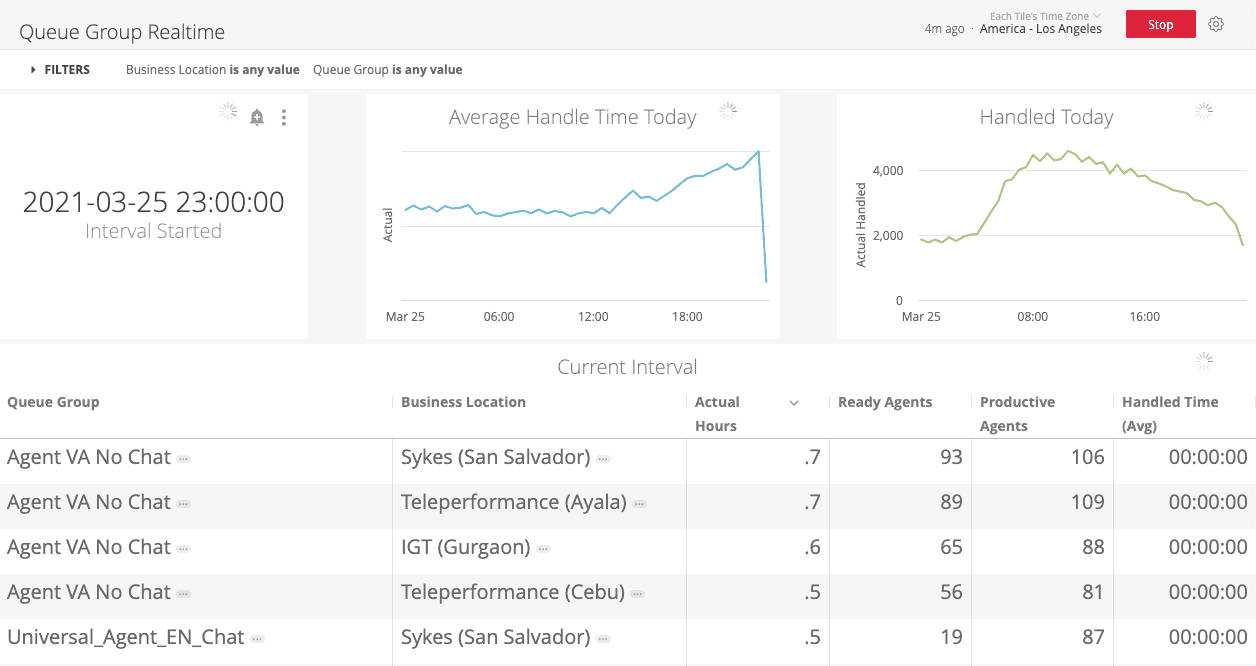
The Queue Group Realtime report provides the average handle time (AHT), number of ready agents, and productive agents, per queue group and business location. You can filter the results by Business Location and Queue Group.
Supervisors and Partner Ops can use this report to answer questions such as:
- How many productive agents are working this interval for a given queue group in a given business location?
- How many actual hours have a given queue group in a given business location produced during the current interval?"
This report uses the Agent Details - Realtime and Agent Current - Realtime Explores to surface information such as agent identity, queues, queue groups, current status, productivity, conversation handle time, and interval compliance.
For more information on fields used in this report, see Core Conversation Metrics for detailed explanation and Agent Dictionary for field definitions.
Queue realtime
The Queue Realtime report provides a view into Queue performance and also a high-level view of Agent Presence at the moment. This report can be filtered on a specific Business Location, Conversation Type, Queue Group, or Queue Name. Either Business Location name or Queue Group name filters can drive the Agent Presence tile. Conversation Type, Queue Group, and Queue Name are responsive filters that drive the queue-related metrics on the dashboard. This report is set to auto-refresh every minute.
Supervisors, Partner Ops, and GC3 (internal command center) staff can use this report to answer questions such as:
- What agent presence states are my agents in currently?
- How many conversations are in a queue?
- What is the ASA of a queue today?
- How long as the longest conversation been in a given queue?
- How many conversations were offered to and handled by a given queue in the last 30 minutes?
- How many conversations were offered to and handled by a given queue today?
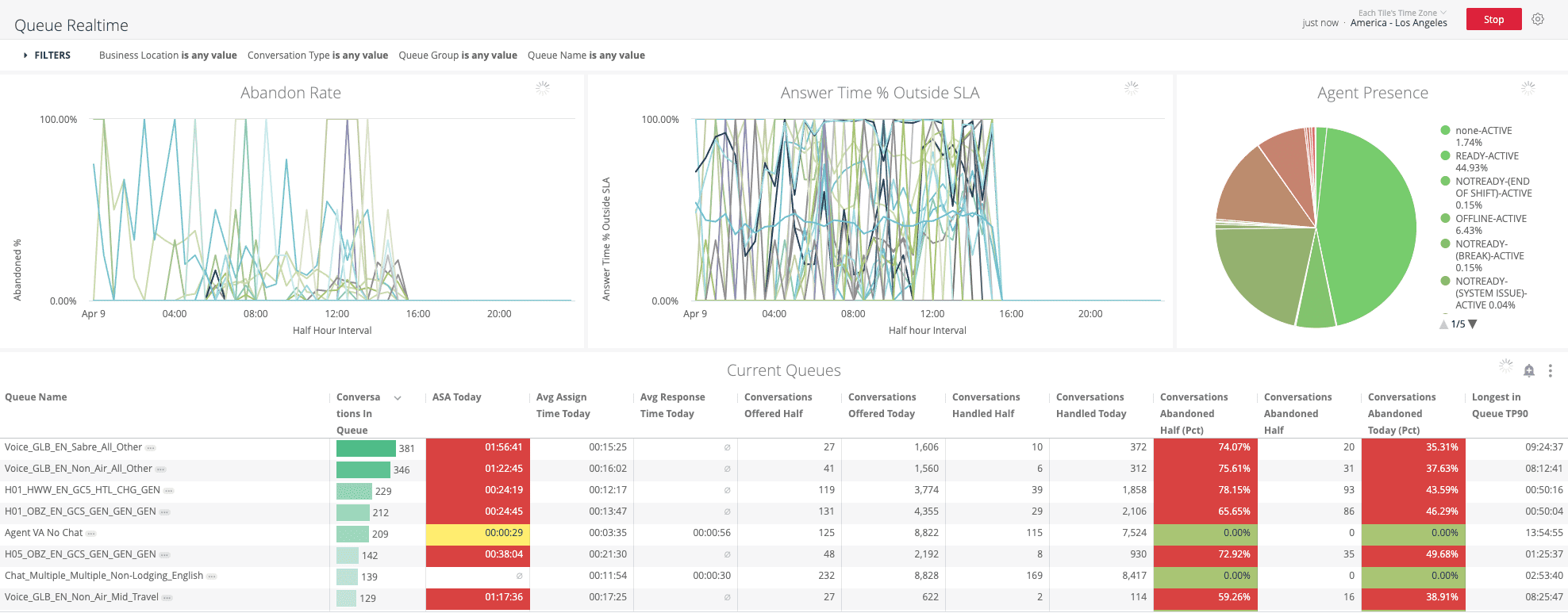
This report uses the Queue - Realtime and Agent Current - Realtime Explores to surface information such as:
- Bird's-eye view of agent presence, segmented by agent states (Agent Presence tile). The color coding uses shades of green to display the population of currently productive agents, whereas shades of red display the agent population that is not productive at the moment.
- Abandon Rate graph—shows the rate of abandonment by half hour interval for a queue (Abandon Rate tile).
- Answer time percentage outside of SLA gives a graphical view of how many conversations are answered outside SLA (30 seconds) for a given queue every half hour interval (answer time % outside SLA).
- Number of conversations in the queue, average speed of answering (ASA)—only applicable for voice queues, average assign time today, average response time today (only applicable for chat queues), number of conversations offered and handled in the current half hour interval and today, percentage of conversations abandoned in current half hour interval and today, longest wait time in queue currently (Current Queues tile).
For more information on fields used in this report, see Core Conversation Metrics for detailed explanation and Queue and Agent for field definitions.
Queue group details
The Queue Group Details report provides the average handle time (AHT), ASA metrics, the number of handled conversations, and other detailed information on up to 24 hours of completed intervals for agents aggregated by queue groups. You can filter the results by Business Location and Queue Group.
Supervisors, Partner Ops, and Lines of Business by Partner can use this report to answer the following kinds questions for any desired set of queue groups:
- How did the Global English queue group perform during a given interval?
- Are we sufficiently staffed for this LOB?
- Does this queue have a large number of calls waiting?
- Do we need to move more agents onto this queue to handle the volume?
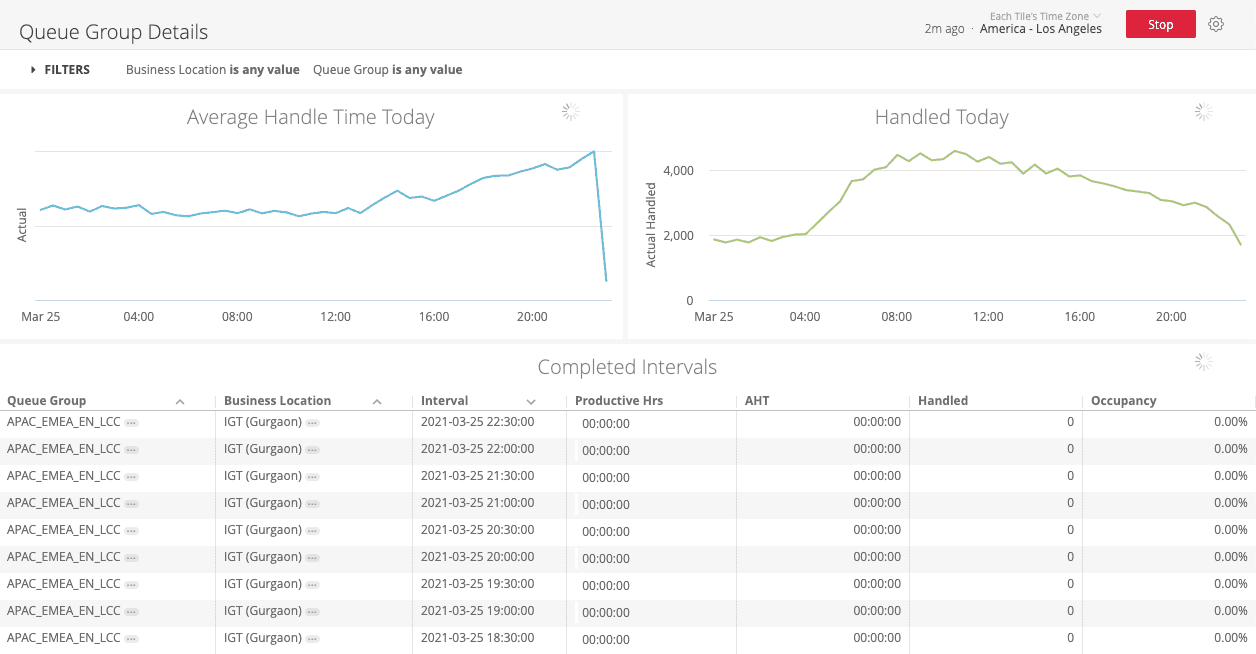
This report uses the Agent Details - Realtime Explore to surface information such as queue group performance, agent identity, conversation handle time, and interval compliance.
For more information on fields used in this report, see Core Conversation Metrics for detailed explanation and Agent Dictionary for field definitions.
Forecast reports
Contact Centers/Partner Ops use these reports to view how a given Child Forecast Group (CFG) is performing compared to forecast. Up to 4 months of forecast data are retained for comparison.
Agent forecast - realtime
The Agent Forecast Realtime report provides the current day’s interval compliance and staffing attainment as well as the number of conversations handled and average handle time (AHT) compared to forecast. You can filter the results by Partner Site and Child Forecast Group Name.
Supervisors and Partner Ops can view this report to answer the following questions:
- What is the interval compliance and staffing attainment percentages for the current day?
- How are my Child Forecast Groups (CFGs) performing in the current interval?
- How are handled counts and AHT compared to forecast for today?
- How have my CFGs performed at a daily level?
- How have my CFGs performed at an interval level for today?

This report uses the Forecast - Realtime Explore to surface information such as group performance, agent productivity, conversation handle time, and interval compliance.
For more information on fields used in this report, see Core Conversation Metrics for detailed explanation and Forecast for field definitions.
Workforce management report
The Workforce Management Report provides summary data compared to forecast. You can filter the results by Partner Site, Child Forecast Group, and Interval time parameters.
Supervisors, Partner Ops, and EG Finance can view this report to answer questions such as:
- What are the productive hours, billable hours, and after hours for a given CFG?
- What is the occupancy of a given CFG?
- How have my CFGs performed at a monthly level?
- How have my CFGs performed at a daily level?
- How have my CFGs performed at an interval level?
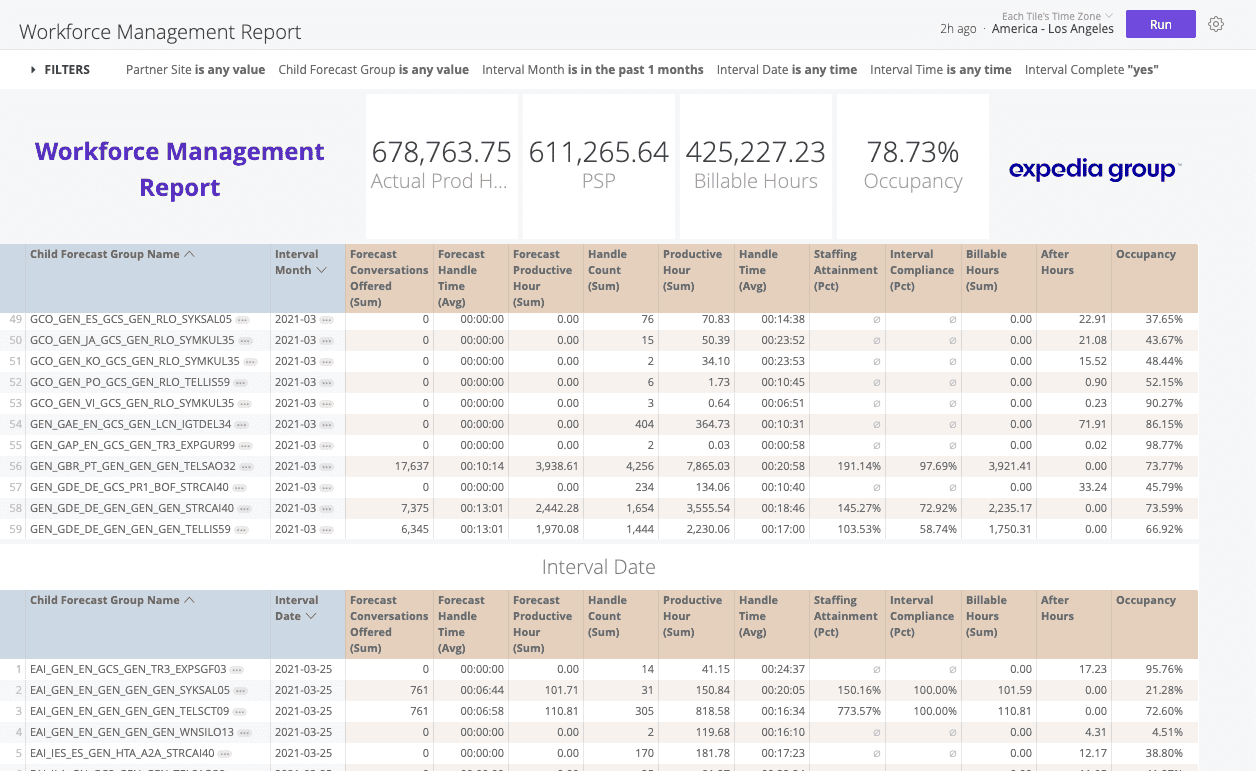
This report uses the Forecast Explore to surface information such as group performance, agent productivity, billable hours, outages, and staffing optimization.
For more information on fields used in this report, see Core Conversation Metrics for detailed explanation and Forecast for field definitions.