Core conversation metrics
Below are the Core Conversation and Agent metrics used in reporting, with detailed explanation and examples.


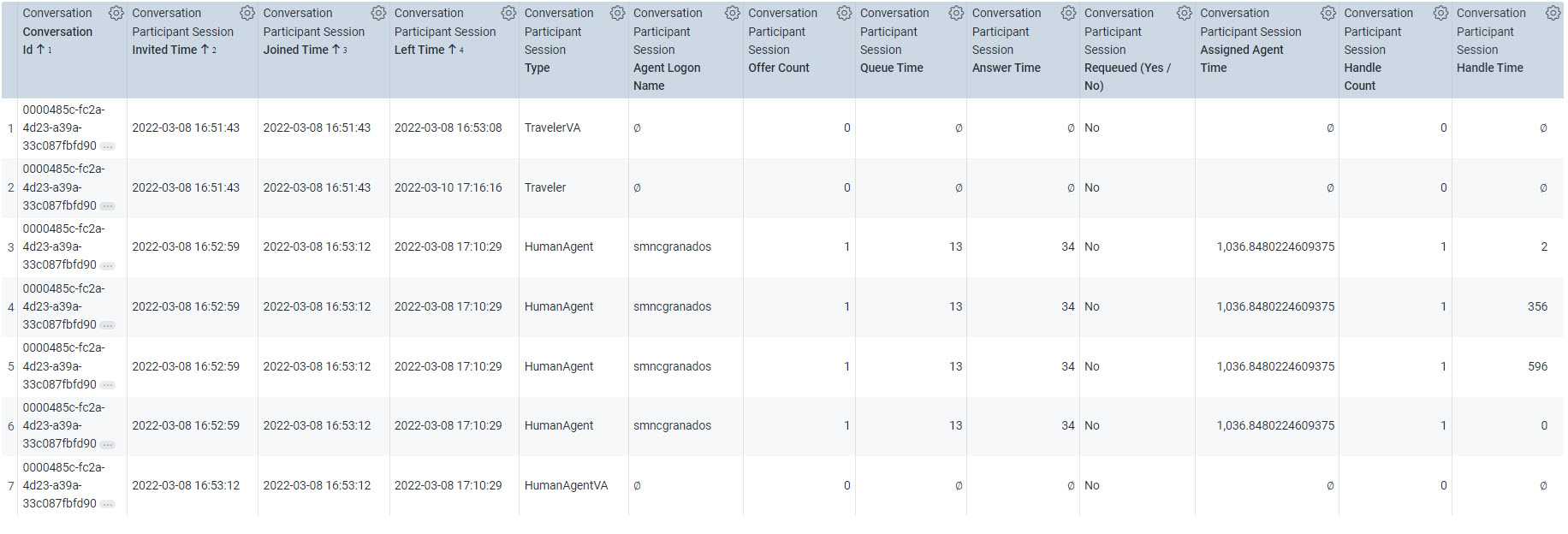
Queue time
- Total time in seconds that Conversation was in Queue waiting to be assigned to a Human Agent.
- For voice calls, if it is auto-answered (no ring), Queue Time = Answer Time
Answer time
-
For Voice channels, this is the total time in seconds from when Conversation was placed in Queue and answered by Agent.
- Answer Time = Queue Time + Ring Time
- In Example above, 3s + 2s = 5s
- If it is auto-answered (no ring), Queue Time = Answer Time
- For Chat channels, this is the total time in seconds from when Conversation was placed in Queue and Agent's first response.
Assigned agent time
- Total time in seconds, a Conversation was assigned to a Human Agent.
- For Voice Channels, if ring is present, assignment starts at the time of ring and includes Ring Time and Handle Time; If ring is not present, then assignment starts when an Agent joins the conversation, effectively making Assigned Time equal to Handle Time (Joined Time – Invite Time).
-
For Chat channels, this is calculated as:
- Assigned Agent Time = Left Time - Joined Time
- In the Chat example above, 17:10:29 – 16:53:12 is 1,037s in duration
- Since this is asynchronous conversation where an Agent can work on multiple conversations at a time, Assigned Agent Time will not equal to Handle Time.
Handle time
- Total time in seconds that Agent worked on Conversation
-
For Voice channels, this is calculated as:
- Handle Time = Assigned Agent Time - Ring Time; In Example above, 335s – 2s = 333s
- If there is no Ring Time, then Handle Time = Assigned Time
- This covers the duration between Join Time and Agent Left Time which includes Talk Time + Hold Time + Wrap up Time (ACW); In Example above, 249s + 53s + 31s = 333s
-
For Chat channels, each duration of focus events will have a Handle time entry. As the nature of such conversations are asynchronous, total Handle may be less than Assigned Agent Time.
- In the example above the sum of Handle Times: 596s + 356s+ 0s + 2s = 954s; This is shorter than the Assigned Agent Time of 1,037s because the remainder time was spent by the Agent servicing another chat conversation.
Average handle time
- Handle Time (Sum) / Handle (Count)
Wrap up time
- Also known as ACW (After Call Work), Wrap Up Time is the total time in seconds the Human Agent spends in post call activities such as data entry, updates, scheduling follow-ups etc.
- Only applicable at this time for Voice conversations.
Abandon time
- Total time in seconds Conversation was in queue and failed to be assigned to a Human Agent. This can happen due to several reasons, for example by system failure or because a traveler intentionally abandoned the conversation.

Sample Abandoned Conversation.

Requeue time
- Total time in seconds a conversation is requeued, which is the time between when the earliest Human Agent was invited to a conversation before it is handled (Effective Invite Time) until the Invite Time of another Human Agent who handled the conversation. This accounts for the time spent in offering the conversation to one or more Human Agents before it finally gets handled.

Consults, transfers, and outbounds

Consults
Consult means a Human Agent is consulting another Human Agent while servicing a conversation. The Human Agent who initiated the consult stays in the conversation. while the agent consulted drops off.
Transfers
A Human Agent can leave a call and transfer it to another entity to continue servicing the call. This entity can be:
- Another Human Agent internally (within CCaaS-Platform) e.g different agent skill is required
- Another Human Agent externally (outside of the CCaaS-Platform)
-
A Supplier e.g. for refunds, etc.
Transfer type
- The type of transfer for this conversation i.e. Warm or Cold Transfer.
- In A Warm Transfer, a Human Agent transfers the conversation to another servicing entity with a proper hand-off to provide context before leaving the conversation. That means the recipient of the transfer joins the call first before the initiating Agent leaves the conversation.
-
In a Cold Transfer, a Human Agent transfers the conversation to another agent without waiting for the later to join the conversation.
Transfer mode
- The mode in which a conversation is transferred by a Human Agent to another participant of the conversation.
-
This can either be 'On-Platform' wherein conversation is transferred within the conversation platform, typically queue-to-queue or 'Off-Platform' wherein conversation is transferred outside of the platform to an external entity like a Supplier or other Agents in an external platform.
Transfer count
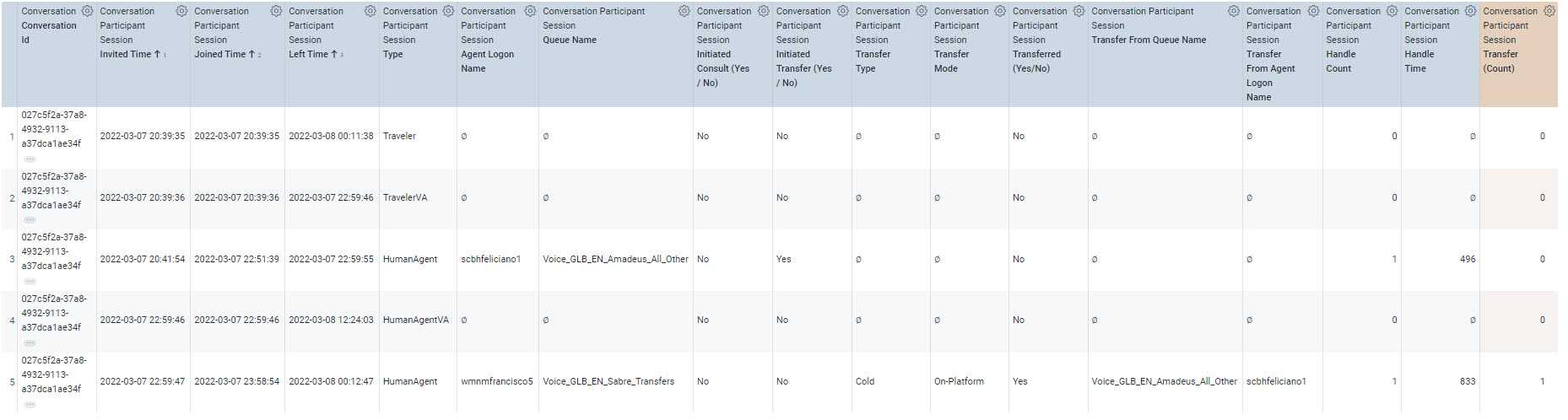
- Count of Human Agent initiated transfer of conversation to another servicing entity which includes successful and unsuccessful transfers (whereby the recipient of the transfer failed to join the conversation).
Let us look at an example of a transferred conversation. In this example, we see that an agent initiated a transfer (row 3, Initiated Transfer = Yes), to another HumanAgent (row 5, Transferred = Yes). This On-Platform Transfer (within the platform) is of type Cold Transfer (note that the initiating Agent left before the recipient of the Transfer joined).
Outbounds
While servicing a conversation with a Traveler, a Human Agent can make a call outside of the platform to another Human Agent or Supplier to continue servicing a call – this is an Outbound. The difference between a Transfer and an Outbound is that the initiating agent of the Outbound call stays in the conversation, while in Transfers, the initiating agent leaves the conversation to another entity who will continue to service the conversation.
Outbound count
- Total count of Outbound conversations which includes successful and unsuccessful outbound calls whereby the recipient of the outbound failed to join the conversation.
-
These include the different types of Outbounds:
- Attached (During Initial Contact) - Outbound call made by the HumanAgent while actively on initial contact with a customer
- Attached (Post Initial Contact) - Outbound call that is related and linked to a previous conversation made by a Human Agent after initial contact with the customer
- Unattached - Outbound call made by the HumanAgent which is not linked to a previous or ongoing conversation i.e. cold calls, marketing calls, crisis, dilemma, etc.
- Voice Bridge - Outbound calls that are related but not linked to a previous conversation
Outbound time
- Duration in seconds for each Outbound Call made by the Human Agent. This is the difference between the time another servicing entity was invited to join a conversation until the time that participant left the conversation.
Let us look at an example of an Outbound call. In this example, a Human Agent handling a Traveler’s call initiated an Outbound call (row 3, Initiated Outbound = Yes) to a Supplier (row 4, Outbound = Yes), in order to continue servicing the Traveler.

Agent metrics
Productive hours

- Total time spent by an Agent either helping a customer, time available to service a customer, and time spent on any agent state considered billable.
-
Agent states for productive hours vary per partner-specific configuration, usually set by a Partner Admin in the platform console. These usually include:
- States available to service a customer such as READY_IDLE
- States servicing a customer such as ACTIVE states
-
Productive Hours can be split into the following. If the Agents are purely handling calls for the interval of time, the sum of these will equal to Productive Hours:
- Productive Inbound Hour: The actual productive hours on inbound calls, and also including Attached During Initial Contact Outbound calls (which are outbound calls made while servicing inbound calls from a customer).
- Productive Outbound Hour: The actual productive hours on outbound calls. This includes hours spent in purely Outbound calls such as Unattched Outbound Calls and Attached Post Initial Contact.
- Productive Idle Hour: The actual productive hours while waiting to service a call.
Occupancy
-
Percent of Agent’s Productive Hours spent in handling a conversation, computed as:
- Handle Time (Sum) / Productive Hours (Sum)
Productive agents (Queue group realtime)
- The distinct count of agents either handling a conversation, available to service a customer with no conversation assigned, or spending time on other billable activities.
Ready agents (Queue group realtime)
- The distinct count of agents available to service a customer. This is a subset of the count of Productive Agents.
Available time
- Time that Agent is available to service a customer with no conversation assigned. This equals to the Productive Idle Hours.
- The Available Time can be derived by looking at the Agent Staff Time duration spent by the Agent in different available states.
Initial response time
- This is the time between the chat assignment and first agent response to the chat.