Workforce management
Workforce management creates reports by combining forecast data published by the Workforce planning team with real-time data captured by agent applications. By comparing the two data types in 30-minute intervals, these reports enable you to compute operational and financial business compliance metrics.
Human agent forecast
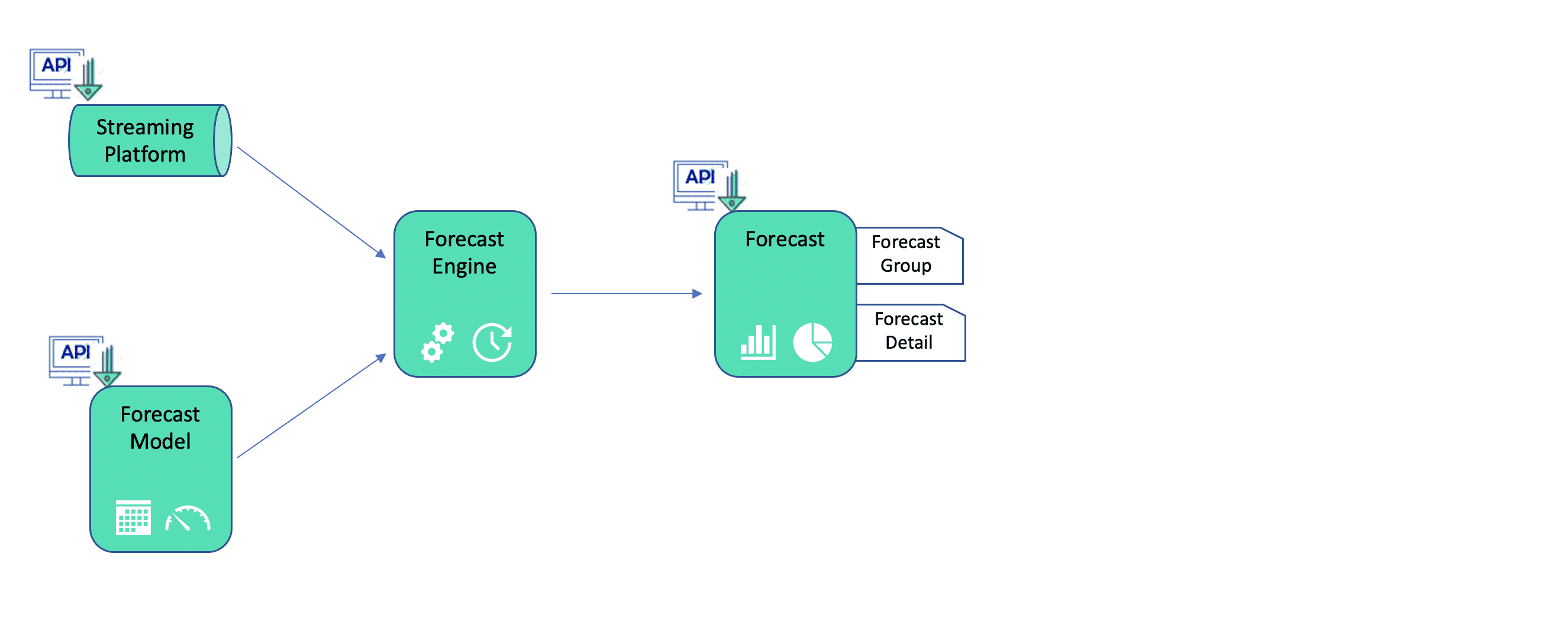
Human agent forecast provides partners with powerful capabilities to administer forecast data, track performance, and manage their human agent workforce. The following diagram illustrates the interaction between the main components in the forecast process: conversation data from the platform, the forecast model & engine, and the forecast itself.
Conversation data
Conversation data from the platform is available to partners as input to forecast models. This data is accessible in a number of flexible formats through the Data API.
Forecast engine/model
Forecast data can be acquired in a couple different ways. External engines/models can integrate with the platform to acquire conversation data in near real-time. Platform configuration data is also available as inputs to forecast engines/models.
Additionally, the Conversation Platform allows for flexible integration with forecast engines/models that generate forecast data via the Data API. This enables you to plug in virtually any solution currently in use or leverage industry standard tools (example: Aspect).
Forecast
Forecast data produced from engines/models is ingested by the platform via the Data API. It’s then displayed in two ways: forecast group & forecast detail.
- Forecast group is a summary object that provides the definition and description of the forecast.
- Forecast detail consists of the interval definition and forecast of three key metrics: conversation volume, average handle time (AHT), and productive hours.
- Productive hours are broken into intervals that look 6-8 weeks ahead. Intervals are typically 30 minutes in length. Forecast definition and mapping to platform are described in detail in the Workforce management integration tutorial.
Architecture

The data warehouse ingests two types of data simultaneously: forecast data & agent events.
- Forecast data is provided by the workforce planning team, and contains conversation and agent productivity metrics, which get categorized by queue group and business location. It is sent to the data warehouse via the data API at a regular cadence.
- Humanagent events stream into the Data Warehouse in real-time, aggregated into 30-minute interval blocks in coordination with the forecast data. As part of adherence, key metrics like Staffing Attainment, Occupancy, and Billable Productive Hours are tracked in near real time.
The aggregation of the two sources using the same 30-minute intervals and their combination takes place in the reporting layer, where the compliance metrics are calculated. Being actual data ingested in real-time, the reports provide an evolving view on how a set of agents are performing against the interval, with no need to wait until the end of the interval.
Workforce management integration
For more information on adding forecast data to the Conversation Platform, refer to the Workforce management integration tutorial.