Routing configuration
Routing configuration allows you to configure the following:
Channel-based provider
You can configure how conversations are routed to agents based on which routing provider will be used for which channels. The Conversations Platform supports two routing providers:
- Salesforce
- Conversations Platform's built-in routing provider
You can choose to route voice conversations to the Conversations Platform's built-in routing provider while at the same time route chat conversations to Salesforce.
If you’re not using the Conversations Platform as a routing provider, you’ll need to set up your agents and queues within the routing provider you’re going to use.
Dialout rules
You can set up rules for voice conversations for conversations that won't be handled by the Conversations Platform. These voice conversations will be redirected to another routing system.
For example, if you don’t have agents that can handle Japanese voice conversations within the platform, you can redirect those conversations to an existing agent tool.
How to add rules
Queue and queue groups
A queue in the routing system is an entity that holds similar type of conversations. A conversation has multiple attributes such as partner, point-of-sale, product, and intent.
A queue is the placeholder to gather conversations with similar attributes that the routing system assigns to. There are two sides of the queue: incoming customer conversations and available agents.

Agents are not directly assigned to queues. Agents are assigned Queue Groups. A queue group is a logical grouping of queues. Assigning a queue group to agents allows one agent work across multiple queues.

How to add queues and queue groups
Prioritization
There are two types of prioritizations that are supported by CPCE routing system:
- Prioritization among queues
- Prioritization in queue
Using these prioritization methods, you can configure the routing system to overwrite the default FIFO order of conversation assignments.
The routing system first uses prioritization among queues to define the first queue to route conversations from. Then the routing system uses priority in queue to select which conversation from the Queue to route to the next agent.
Prioritization among queues in a queue group
Prioritization among queues sets the priority of queues in the context of the queue group they belong to. Since agents are assigned to queue groups, agents can receive conversation from multiple queues which are part of that group.
However, sometimes you might want to set a priority among the queues in a group to determine which conversations should be assigned first to agents.
Below is an example of a queue group with multiple queues at different levels of priority.
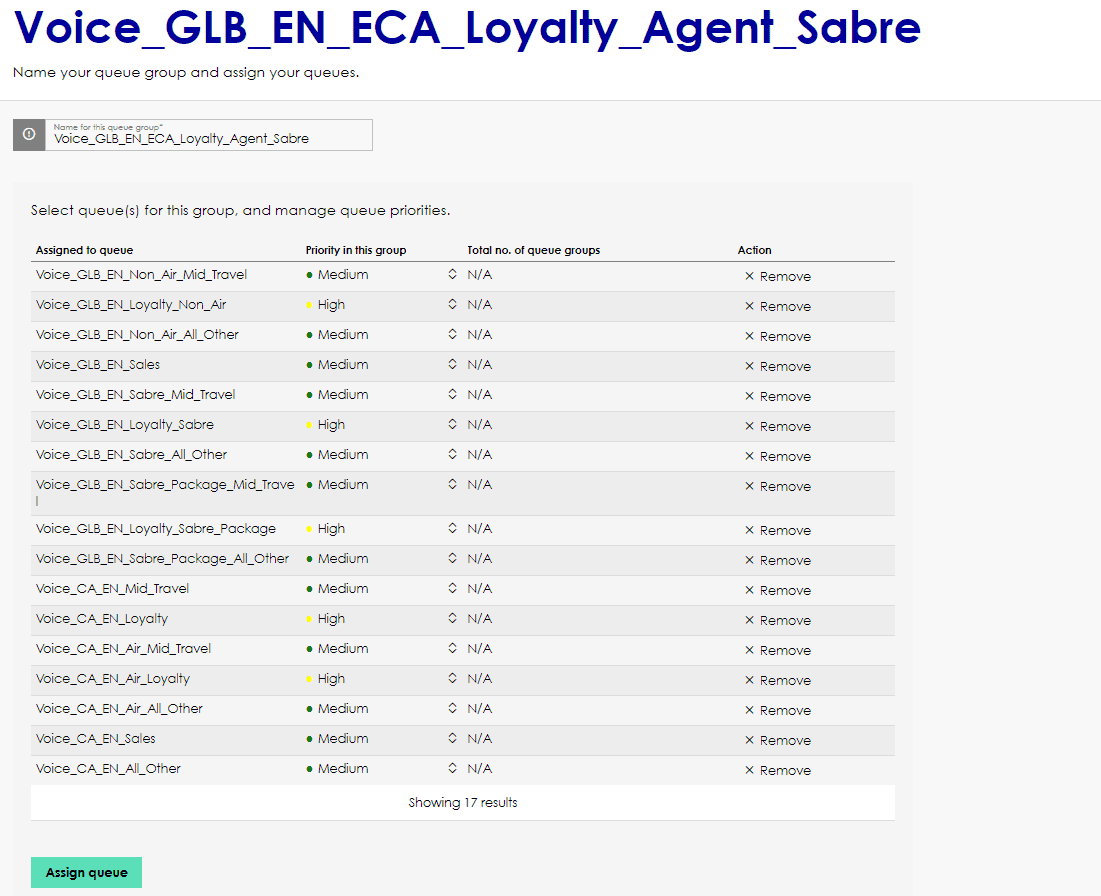
In this example, conversations in queues with a High priority such as VoiceGLBENLoyaltyNonAir are assigned to agents before conversations in a queue with a Low or Medium priority, such as VoiceGLBENSales.
There are 5 priority levels: Very High, High, Medium, Low and Very Low.
If there are multiple queues with same level of priority then conversations from all these queues with same priority will be assigned based on FIFO order.
Prioritization in queue
The Conversations Platform's routing application also allows you to prioritize a conversation when it’s put in a queue. A higher priority gives the the conversation a higher priority for assignment within that queue.
The order of conversations within the same priority group is (First In First Out) FIFO. Once the priority is set for any conversation, it can't be modified afterwards.
Below are some examples of how the priority feature works.
Example
At the beginning of the day the queue is empty.

Conversations C1 and C2 are created in the same order without any priority (Priority 0). In this case the queue structure looks like as below.

Since C1 was created before C2, C1 stays at the front of the queue followed by C2. Since Agent is in Not-Ready state, all the conversations remain in the queue.
Conversation C3 is created with a priority 1. Since C3 will have higher priority than C1 and C2, C3 goes to the front of the queue, followed by C1 and C2.
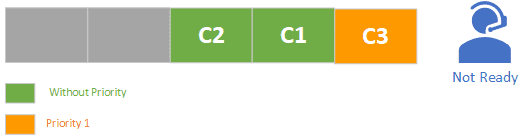
Conversation C4, with priority 1, is created. The structure of the queue looks like this.
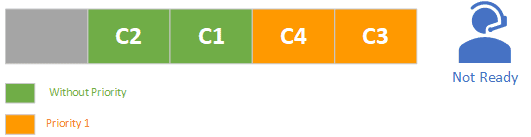
C3 and C4 have the same priority but since C3 was created before C4, C3 remains at the front of the queue.
When the agent comes online the following order will be maintained for agent assignment.
C3 is assigned first followed by C4, C1, C2 in that order.
Workspace
A workspace defines a container and boundary within which the routing engine operates. An agent, queue, and conversation must be created inside a workspace. Agents from one workspace cannot receive conversations from another workspace. A brand new workspace must be created in the following cases:
- You’re managing your own agents and queues
- You’re using the Conversations Platform for at least one channel and that agent population is not shared with any other partner