Chat Features
Voyager Next is a multichannel workspace tool for agents to help and service customers. Chat feature allows agents to communicate with multiple customers at a time. Paired with the Virtual Agent, chat can become a powerful tool not only for customers to self-serve, but for agents to utilize the bot's skills.
Specifications:
- Multi-channel interface (allows Voice, Chat, Social, Email, Service Requests)
- Agent Assistant
-
Chat Tool Window
- Conversation History
- Multiple Conversations
- Time Tracking
- Chat Transfer
- Supervisor Search
Customization
Voyager NEXT can be configured to partner or agent preferences. See Voyager NEXT Customization.
Multi Channel Support
Voyager NEXT aggregates all conversations in one user interface. This multi-channel capability allows customers to contact agents on their preferred channel. Voyager NEXT supports the following channels:
- Voice
- Chat
- Social (Facebook Messenger, WhatsApp, Twitter)
- Service Requests
Agent Assistant
Integrated AI-powered chatbot for agents. Artificial Intelligence assists the agent's workflow and recommends content to use for greater efficiency and better outcomes. Agents will have the information they need, when they need it, for the ultimate assist.
- Itinerary transactions: Any skills or journeys that are available on the customer side would also be available on the agent facing virtual assistant (VA). Skills like cancel booking, change booking, etc. will be available on agent assist VA and agents will be simply be able to give a command to VA to take the necessary action.
- Knowledge base queries
- Customer verification
- Advanced itinerary transaction: In addition, agent facing VA has some advanced transactional capabilities like processing goodwill refunds, etc. which are not available to the customer.

Chat Tool Window
- Conversation History - Agents can scroll up in the chat to see and review the previous messages. Allowing agents to come up to speed on the issue and customers not having to repeat themselves with newly assigned agents.
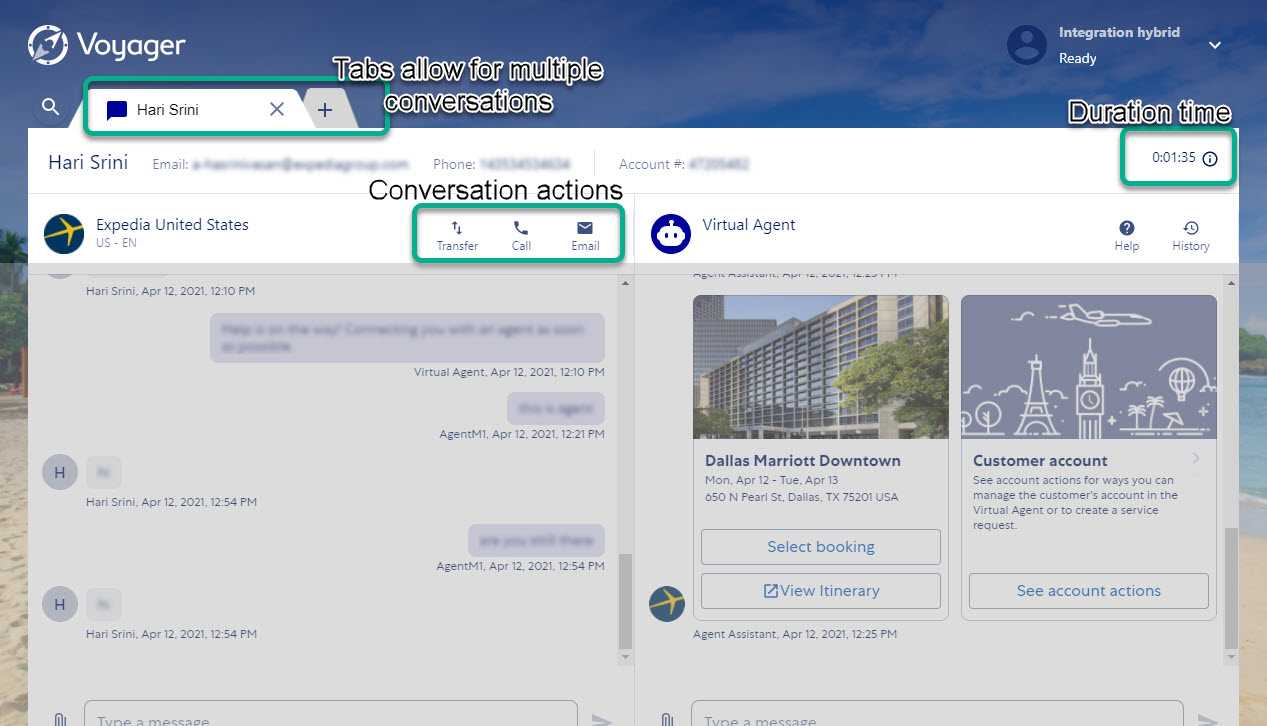
- Multiple Conversations - Agents can chat with multiple customers at the same time.
- Time Tracking - Shows the time spent on each conversation.
- Chat Transfer - Allows agents to transfer chat session to a different agent if the chat is incorrectly routed or the objective changed.

Supervisor Search
Supervisors can see their agents' availability, each of their active work items, and current duration in real time so that they can drill down into each work item (silent monitoring) and take action (claim, reassign, etc.) if needed.

Supervisors Search Actions:
- Open in a new tab
- Release claim
- Remove as spam
- Remove as no response needed
- Return to queue