Ad hoc Analysis
You can use ad hoc analysis to investigate data available in Explore and create your own visualizations/dashboards. The reports you create will be saved in the My Reports section for future access.
Currently, ad hoc analysis is available in the Customer Experience Explore. Partner Administrators can also create and share reports with other users by saving the reports in the shared space provided for each partner.
Use the following steps to perform ad hoc analysis on your data:
- Select Business Objects you wish to analyze.

- View the list of attributes that can be used for filtering, grouping, and pivoting.

- Select attributes you wish to view as filters, columns, or pivots.

- View data for your selected attributes.

- Visualize the data using a custom set of chart types.

- To save, click the Settings button next to the Run button and select Save to Dashboard.
Creating and Sharing Custom Reports & Dashboards
After creating the visualization you need, you can save it as a new dashboard/report. Partner Administrators can save the dashboard to the shared space for a partner. The new visualization is now published and now all users for that partner can see the dashboard.

When creating dashboards, enter edit mode, and opt to add charts or change existing ones using a view identical to the ad hoc analysis view for creating reports and dashboards from scratch.

Users can also save the visualizations they create under the "MyReports" folder. These reports won't be visible to other people.
Downloading Data Manually
Data can be downloaded from any dashboard either in CSV or PDF formats.
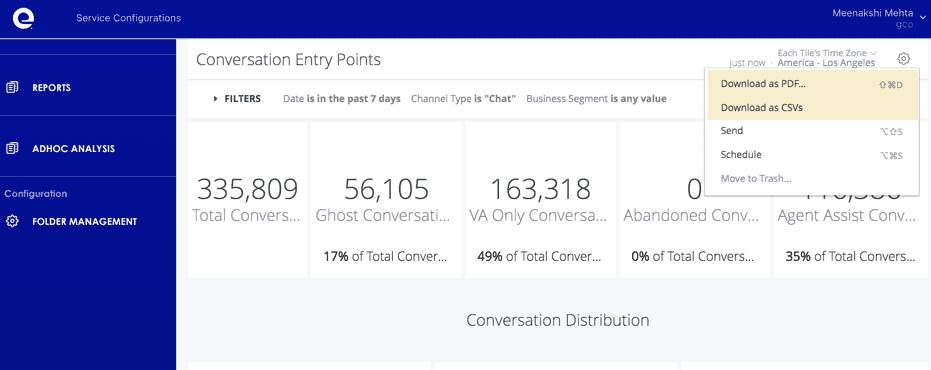
Individual records can also be viewed and downloaded from a dashboard by clicking on selected charts. The record result set can now be viewed and downloaded. Records can be downloaded during ad hoc analysis as well.
Configuration
Folder Management
The Folder Management option is only visible to Partner Administrators. This configuration option allows administrators to create folders under the Partner Shared space so that dashboards can be saved here.